
Critical equipment
We need to know
Quantity and type of PCs, servers, workstations and specialized systems; video and USB interfaces.
Determines
Number of KVM modules, adapters, mounting and rack scope.
KVM-over-IP technical access
Secure, centralized access to every critical PC, server and specialized system in the room—even before the operating system loads.
A complete architecture combining 4K KVM access, technical workstations, identity governance and integration engineering to operate, diagnose and recover critical assets from authorized locations.
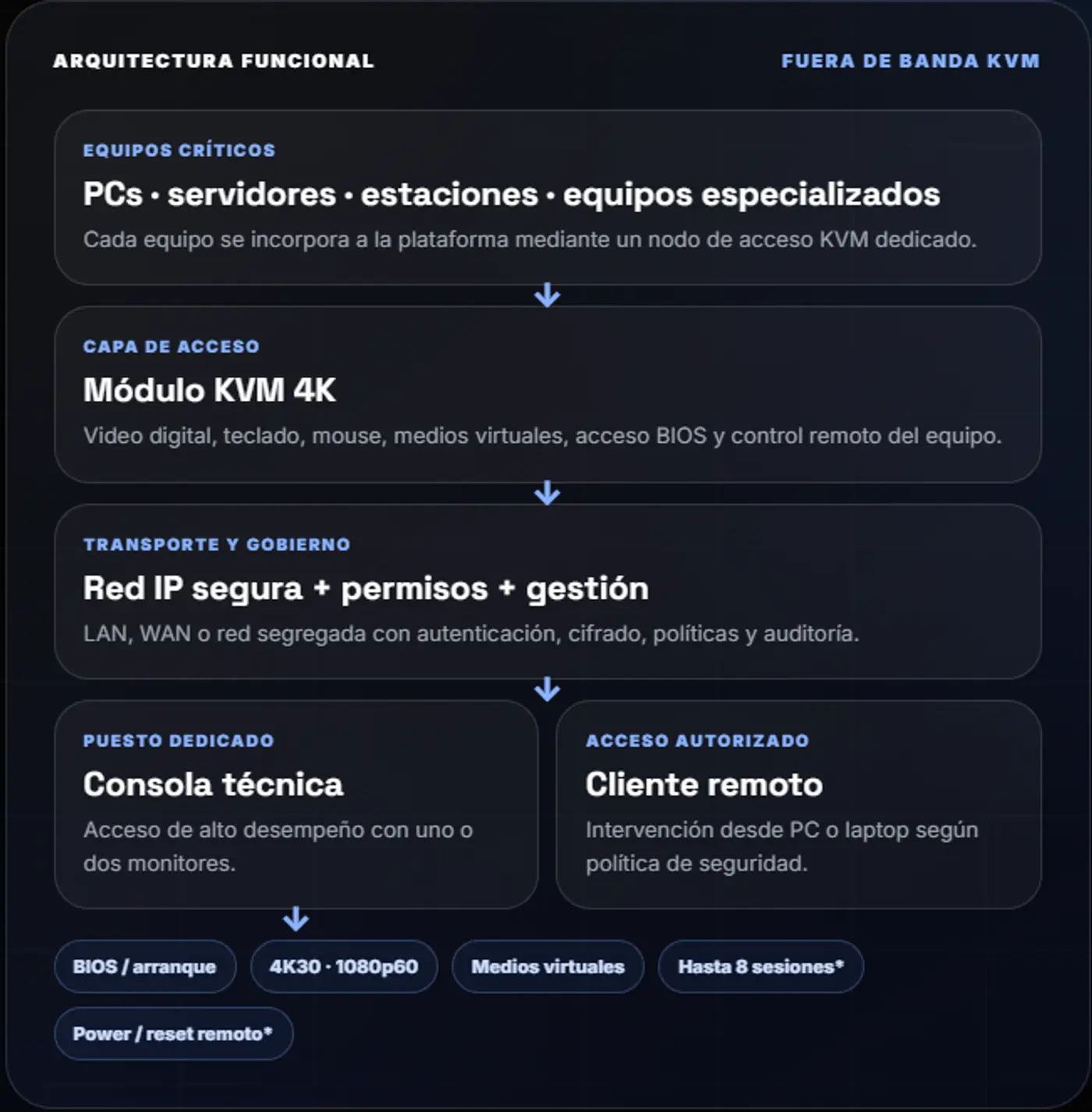
The platform brings together specialized infrastructure, access governance, cybersecurity and full-lifecycle engineering in one coherent solution for critical operations.
Maintain control of the system during boot, an operating-system failure or a recovery procedure.
Out-of-band, BIOS-level access.
High-resolution digital video.
Keyboard, mouse, audio and virtual media.
Direct local intervention when required by procedure.
Consolidate access to multiple assets at one dedicated position, without moving the specialist between racks or consoles.
Single- or dual-display configuration.
Multiple simultaneous IP connections.
KVM, RDP, VNC and SSH access.
Desktop, rack or VESA mounting.
Organize identities, systems, permissions and policies so the platform can scale without losing control.
Centralized sign-on.
Users, groups and permissions.
Scale across multiple access points.
Integration with corporate services.
Design, commissioning and support are delivered as one operational-continuity discipline.
Assessment and architecture.
Configuration and security hardening.
Testing, training and documentation.
Lifecycle support and evolution.
Complete scope: the configuration is defined by asset criticality, access profiles, network topology and recovery procedures.
The platform removes dependence on isolated point-to-point connections. Each critical asset joins a common KVM-over-IP access layer and becomes available to authorized workstations according to role.
Industrial PC, server, workstation, specialized device, management console or dedicated system.
HDMI / video adapters + USB
Digitizes the system’s KVM interface and preserves access during boot, an operating-system failure or recovery.
Compact format · silent operation · local port
Gigabit connectivity over LAN, WAN or a segregated network, with cybersecurity controls defined for the project.
IPv4/IPv6 · HTTPS · VLAN / firewall
Applies identity and authorization policies to assets connected to the platform.
Single sign-on and corporate directory integration according to scope
Dedicated technical console or remote client for maintenance, diagnostics, contingency and support.
One or two displays · multiple sessions
Final specifications are configuration-dependent. The platform can support anything from a single technical-access point to an architecture spanning dozens or hundreds of systems.
KVM-over-IP module for remote management of a PC, server or workstation, independent of the operating system.
Out-of-band, BIOS-level access through a Java-free client.
High-speed virtual media and absolute mouse synchronization.
LDAP, Active Directory or RADIUS authentication and 256-bit AES encryption.
Local HDMI/USB port for direct at-the-rack intervention.
External dry-contact control for remote power-on or restart, according to the integration.
Fanless operation, compact form factor and Gigabit networking.
A high-performance access appliance that consolidates KVM sessions and management protocols at one dedicated position.
Up to 4K desktop resolution with sessions arranged across one or two displays.
Access to KVM points and complementary RDP, VNC and SSH connections.
Virtual media, USB audio, favorites, shortcuts, scanning and matrix view.
Window management with saved and restored screen layouts.
Desktop, 19-inch rack or VESA mounting behind the display.
Optional integration with the centralized management layer.
*Configuration and concurrency: resolutions, session counts, control functions, protocols and management capabilities depend on the technology configuration and architecture selected for each project.
The platform is designed around separation of duties, least-privilege access, corporate authentication and network controls appropriate to the operational environment.
Users and groups receive access only to the systems and functions they require.
LDAP, AD or RADIUS integration according to the client’s policy.
Deployment on the corporate LAN, a separate network or firewall-protected segments.
Additional workstations, redundant links and protected power according to criticality.
The specialist can access any authorized system without moving between racks or consoles.
Technical console → IP network → critical-system module.
Diagnostics, reinstallation or recovery when the operating system is unresponsive.
Out-of-band access → boot → service media.
Controlled access from another room or site through the authorized network.
Remote client → authentication → assigned asset.
Access essential assets from an alternative location during an incident.
Contingency profile → priority sources → alternative workstation.
The number of access points is only the starting point. The right architecture also accounts for concurrency, video, network, authentication, management, power and continuity.
Quantity and type of PCs, servers, workstations and specialized systems; video and USB interfaces.
Number of KVM modules, adapters, mounting and rack scope.
Technicians, supervisors, NOC, contingency positions, display count and simultaneous sessions.
Technical consoles, remote clients, profiles and concurrency capacity.
Resolutions, refresh rate, color quality, audio and multi-window layout requirements.
Access-point model, display configuration and user experience.
LAN/WAN, segmentation, firewall, directory, remote access and audit policies.
Topology, access rules, authentication, encryption and centralized management.
Need for BIOS access, virtual media, a local port and remote power-on or restart control.
Control wiring, dry contacts, procedures and technical permissions.
Failure impact, recovery time objective (RTO), priority systems and interruption tolerance.
Redundancy, protected power, alternative workstations and required support.
Out-of-band technical access to manage, diagnose and recover critical systems across the entire room.
Support, maintenance and contingency.
BIOS, boot and virtual media.
Technical console or authorized remote access.
Centralized management and role-based security.
KVM extension and switching for operators to work with their applications from the console every day.
Continuous operational experience.
Video, USB and control at the workstation.
Centralized sources located away from the console.
Architecture defined by operations and ergonomics.
The platform provides visibility and access capability. RemoteCare adds specialist intervention, remote follow-up and service aligned with the level defined for the project.
Sesiones autorizadas para diagnóstico, soporte y recuperación de los equipos incluidos dentro del servicio.
Análisis de estados, eventos y alertas disponibles; la frecuencia y profundidad dependen del plan contratado.
Horarios, escalamiento, reportes y soporte en sitio se establecen en la propuesta específica de RemoteCare.
To size BRCO ControlRoom KVM Access, we review critical assets, authorized workstations, available network infrastructure, recovery requirements, security policies and expected growth.
The configuration depends on the technical-access scope, asset criticality and the expected recovery experience.
PCs, servers, workstations, specialized systems, video and USB interfaces, audio and remote-control requirements.
Technicians, supervisors, NOC and contingency positions, locations and expected session concurrency.
LAN/WAN, segmentation, directory, firewall, auditability, continuity and expected growth.
This information supports an initial technical review of the scope and separates the base configuration from optional capabilities.