

Physical capture
HDMI and DisplayPort
Integrates local signals from workstations, equipment, video processors, auxiliary systems or physical project sources.
BRCO WorkPlace Core
Windows-based controller to capture physical signals, access IP sources, run applications and organize information into layouts and scenes.
Designed for control rooms where content comes from workstations, remote systems, virtual machines, dashboards, HDMI/DP sources and IP streams. WorkPlace Core integrates everything into one visual working surface.
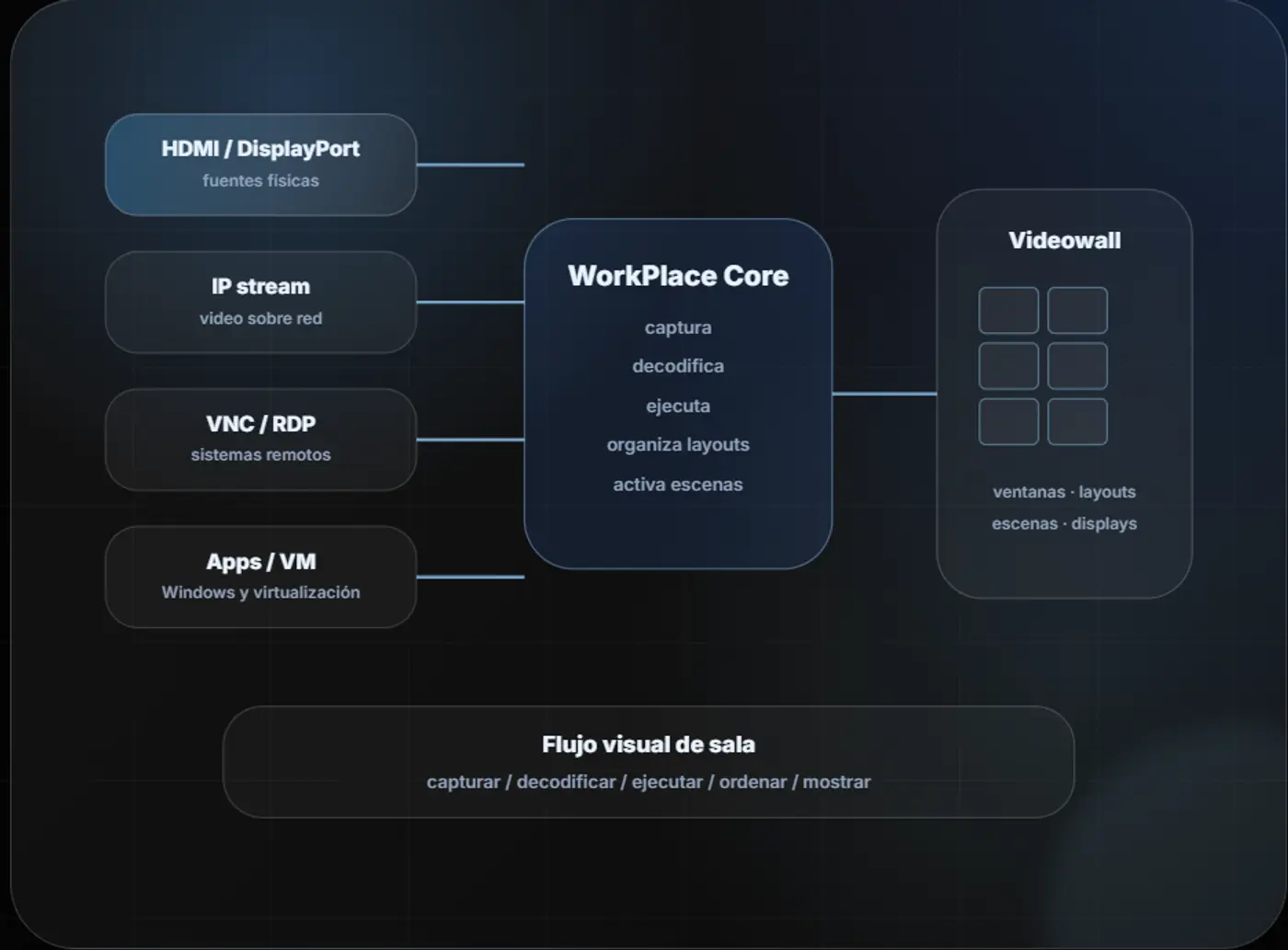
WorkPlace Core brings together physical sources, IP sources, remote desktops, virtual machines and Windows applications to turn them into operational views on the video wall.
Physical capture
Integrates local signals from workstations, equipment, video processors, auxiliary systems or physical project sources.

IP sources
Decodes IP content and provides access to remote desktops or systems according to network architecture and technical scope.

Windows 11+
Allows authorized Windows applications for dashboards, thin clients, web tools or operational software to be installed.

Visualization
Arranges windows, saves layouts and prepares views for normal operation, incidents, shift changes or supervision.
Reduces dependence on physical inputs only. It combines signals, applications, remote desktops and IP content into one visual experience.
authorized applications can run on the platform when the scope allows it.
layouts and scenes reduce repetitive manual changes.
integrates local, remote and virtualized sources according to engineering.
Control rooms, monitoring centers, NOC/SOC, security, mining, energy, utilities and visual modernization projects.
flexible platform for video wall and modernization proposals.
definition of sources, network, applications, permissions and growth.
consistent visual operation for supervisors and operators.
The main public version is 4RU. Configuration is defined by number of sources, content type, applications, resolution, outputs, network, operators and operational load.
Main version
Windows-based platform for permanent installation in technical rack, data room or equipment room. Special formats are reviewed case by case during engineering and are not presented as a second public commercial line.
Windows 11 or higher.
HDMI and DisplayPort.
IP stream, VNC and RDP.
Authorized Windows software, dashboards and VM.
4RU rack-mount.
Windows, layouts, scenes and displays.
Up to 64 FHD / 16 4K depending on configuration.
SSD RAID 1 + Hot Spare.
Sustainable design criterion: WorkPlace Core helps reuse existing sources and systems, reduces the need for dedicated hardware for every application when the scope allows it, and is sized for planned growth.
Reuse of the customer's physical, remote and virtualized sources.
Less equipment duplication for applications that can run on Windows.
Scaling reviewed by engineering according to real room operation.
To size WorkPlace Core, HDMI/DP sources, IP stream, VNC/RDP, Windows applications, virtual machines, displays, resolutions, layouts and daily operation are reviewed.
Configuration depends on how the video wall will be used in daily operation.
HDMI/DP, IP stream, VNC, RDP, applications, dashboards, documents and VM.
Quantity, resolution, video wall type, auxiliary displays and distances.
Operators, supervisors, layouts, scenes, permissions and expected growth.