

Multi-display operation
Smart Mouse
The cursor moves across displays and changes systems according to the configured layout.
BRCO / Operational KVM for control rooms
Control critical systems from every operator workstation.
Centralize SCADA, VMS, GIS workstations and applications in the equipment room, while providing each operator with authorized access over IP or fiber.
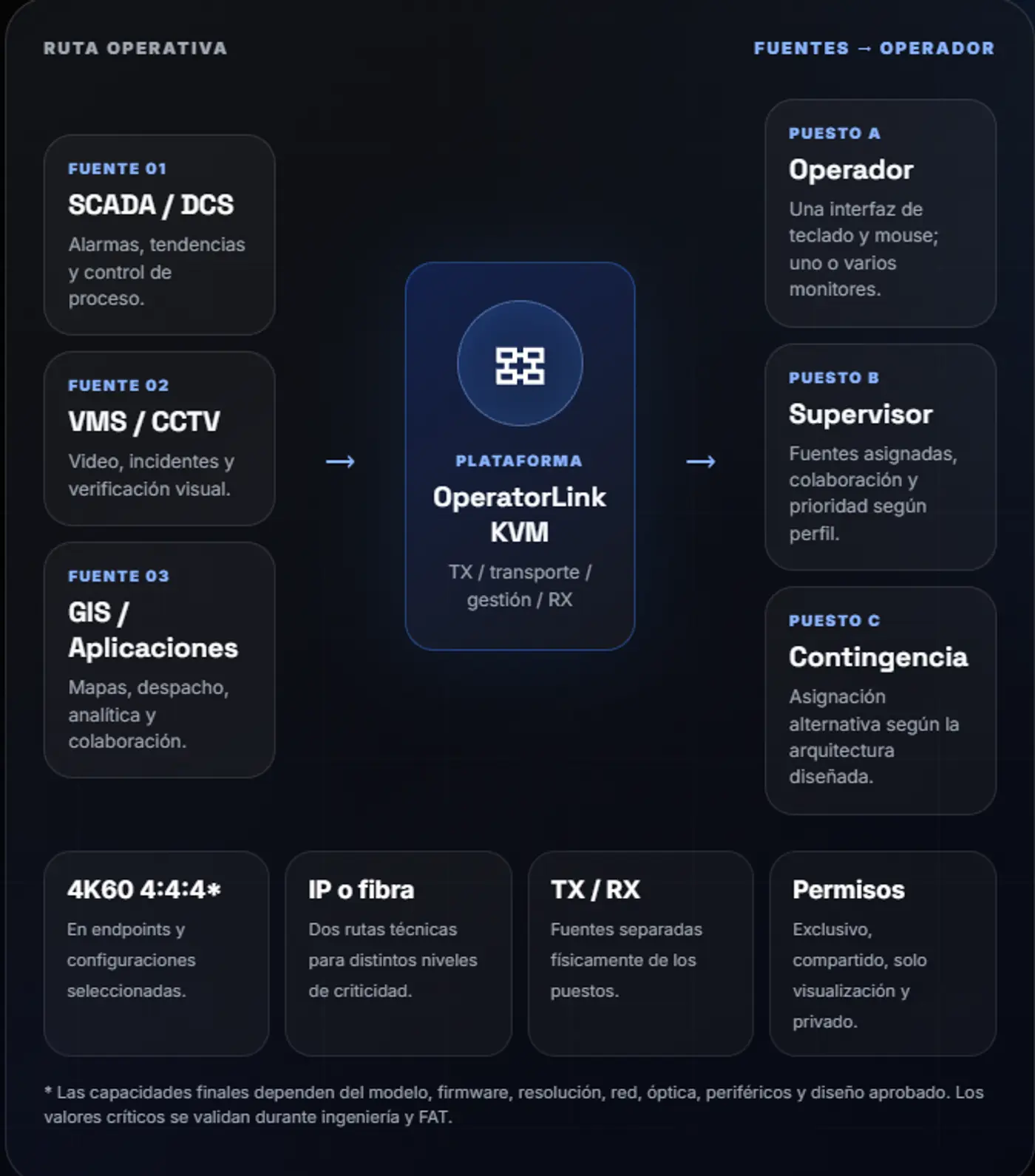
Centralize computers and define how each operator views, selects and controls authorized sources.
Computers, heat and ventilation remain outside the operator workstation.
One workstation accesses multiple sources through a single control interface.
Sources and users are linked through permissions and sessions.
Equipment can be serviced without dismantling or disrupting the console.
Site assessment, FAT/SAT, Spanish-language documentation and lifecycle support for projects across Peru and Latin America.
The decision depends on latency, visual quality, distance, resilience, scale and the acceptable level of network dependency.
TX/RX endpoints over a Gigabit network, scaling by source and workstation without a central processing matrix.
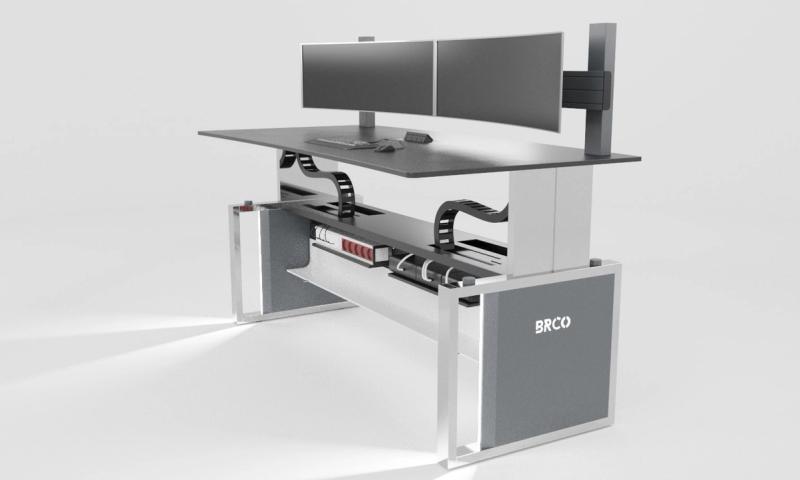
Best suited for: modular growth, multiple users and efficient deployment over a managed network.
FPGA matrix and dedicated links for ultra-low latency, uncompressed signal transport and greater determinism.
Best suited for: operations that prioritize ultra-low latency, dedicated fiber and greater determinism.
Controlled specifications: values are nominal for selected product families. Contractual scope is confirmed by model, firmware, design and FAT.
FAT validation: resolution, EDID, latency, switching, USB, link loss, permissions and recovery.
The interface prioritizes fast selection, visible context and clear control rules.
Multi-display operation
The cursor moves across displays and changes systems according to the configured layout.

According to model and layout
Multiple sources can be viewed and selected from a single display.

Operational collaboration
Authorized users can take or push sources to collaborate during an incident.

OSD · Presets · Follow Me
Sources, presets and permissions can follow the user across enabled workstations.
Source permissions
One user retains control.
Authorized users collaborate according to the defined policy.
The source is displayed without keyboard or mouse control.
The source is restricted to specific profiles.
Sessions and priority
Identity and role.
Authorized access.
Defined control takeover.
Permissions, sessions, takeover and collaboration are documented before implementation.
Segmentation, credentials, USB ports and management access are defined with IT and OT teams.
Design principle
The operational network, management network and any remote access must be separated and documented according to the customer’s policy.
Defined VLANs, routes and network diagrams.
Managed users, roles and passwords.
HID and transparent ports according to policy.
Approved versions, backups and traceability.
Mandatory validation: protocols, encryption, ports, credentials and management access are confirmed by model and scope. Compliance is never assumed automatically.
The architecture can start with one extension and grow to multiple sources, users and workstations.
Extend a system located away from the console to a dedicated operator.
The operator selects among authorized systems using OSD, hotkeys or the defined interface.
Shared sources, priorities, collaboration, multiview and workstation-based growth.
Fiber, ultra-low latency and backup options for highly critical operations.
Endpoint, displays, peripherals, cabling and maintenance are resolved as one workstation engineering package.
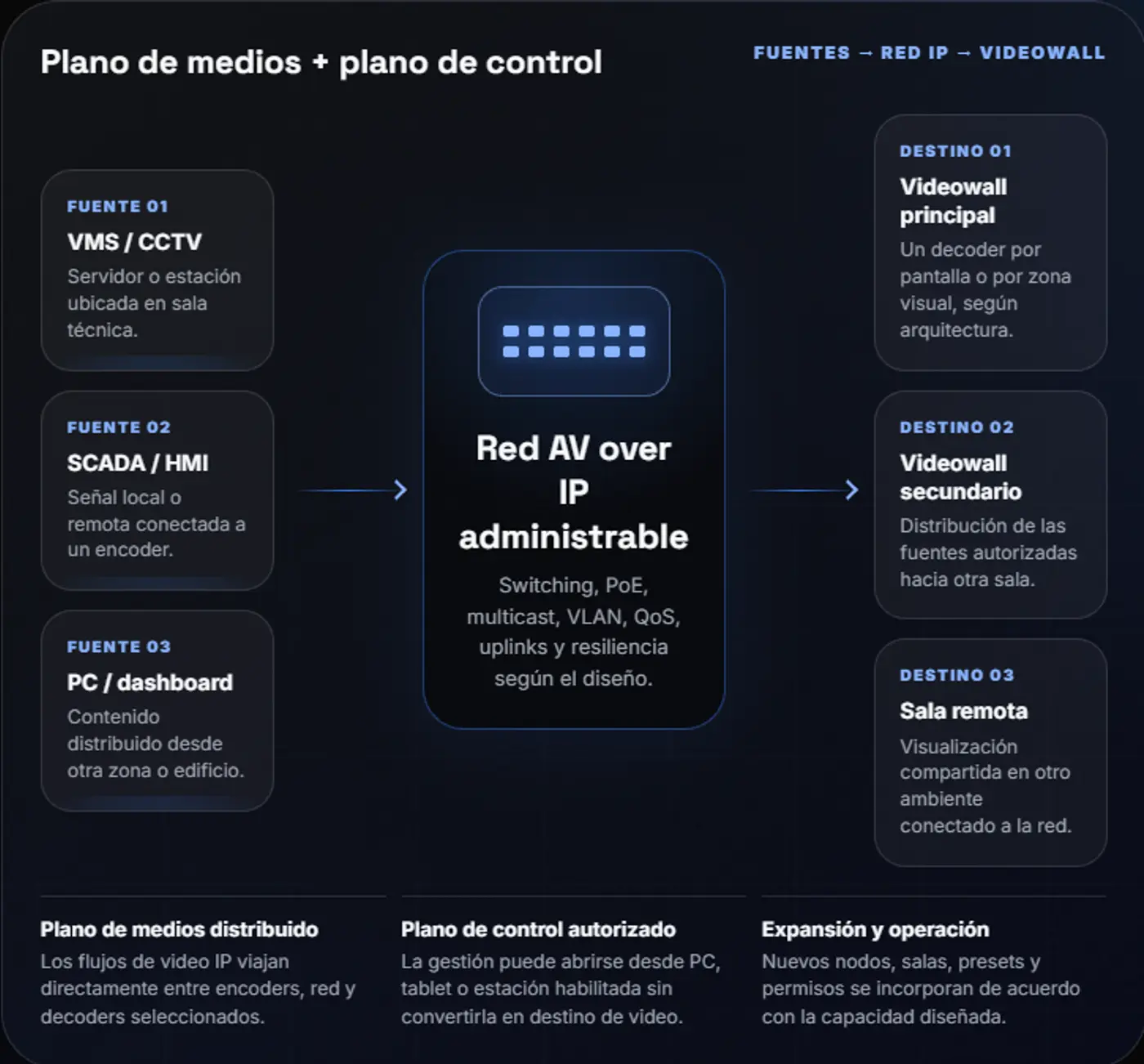
RX installed in an accessible, protected technical compartment.
Single, dual, ultrawide or multi-display according to the application and validated resolution.
Keyboard, mouse, trackball, touchscreen, audio or USB according to compatibility testing.
Separate routes for video, USB, network, fiber and power.
Space and procedures for fast replacement or a spare endpoint where required.
Quality depends on a tested signal chain, controlled documentation and support after deployment.
Sources, users, network, resolution, EDID, peripherals, permissions and growth.
Controlled BOM, configuration, testing, training and technical handover in Spanish.
Spare units, backups, approved firmware and replacement or restoration procedures.
Endpoint status, alerts and remote support according to the contracted service level.
Responsible lifecycle: existing infrastructure is reused only after validating capacity, compatibility and remaining service life. Environmental savings are not claimed without measurement.
Access workstations, alarms, trends, GIS and coordination systems from defined operator positions.
Process, dispatch, video, analytics and specialized systems without CPUs at the console.
VMS, maps, incidents, communications and shared sources with operator-based permissions.
Traffic, CCTV, operational information and process systems from defined workstations.
For operators and supervisors to work daily with authorized systems from their consoles.
For maintenance, diagnostics, recovery and authorized technical access. It serves a different function.
We define sources, users, distances, peripherals, network and continuity requirements before selecting endpoints.
Sources, operators and displays per workstation.
Resolutions, refresh rates and applications.
Equipment locations and distances.
Available network or dedicated fiber.
USB peripherals, audio and touchscreens.
Permissions, redundancy and required support.